The best Business Suite software in India, built to help your business grow. Contact us at +91-8882435276.
[ Contact ]
Phone number
Email address
Head office
Noida office
[ Get in touch ]
Share a few details and the right team at TriostackOne will get back to you.
Combine videos, documents, quizzes, and assignments into courses your team can finish on any device.
Rules enroll new employees, departments, and managers in the right path as soon as their HRMS record changes.
Completions, quiz scores, and issued certificates roll up for managers, auditors, and compliance reviews.
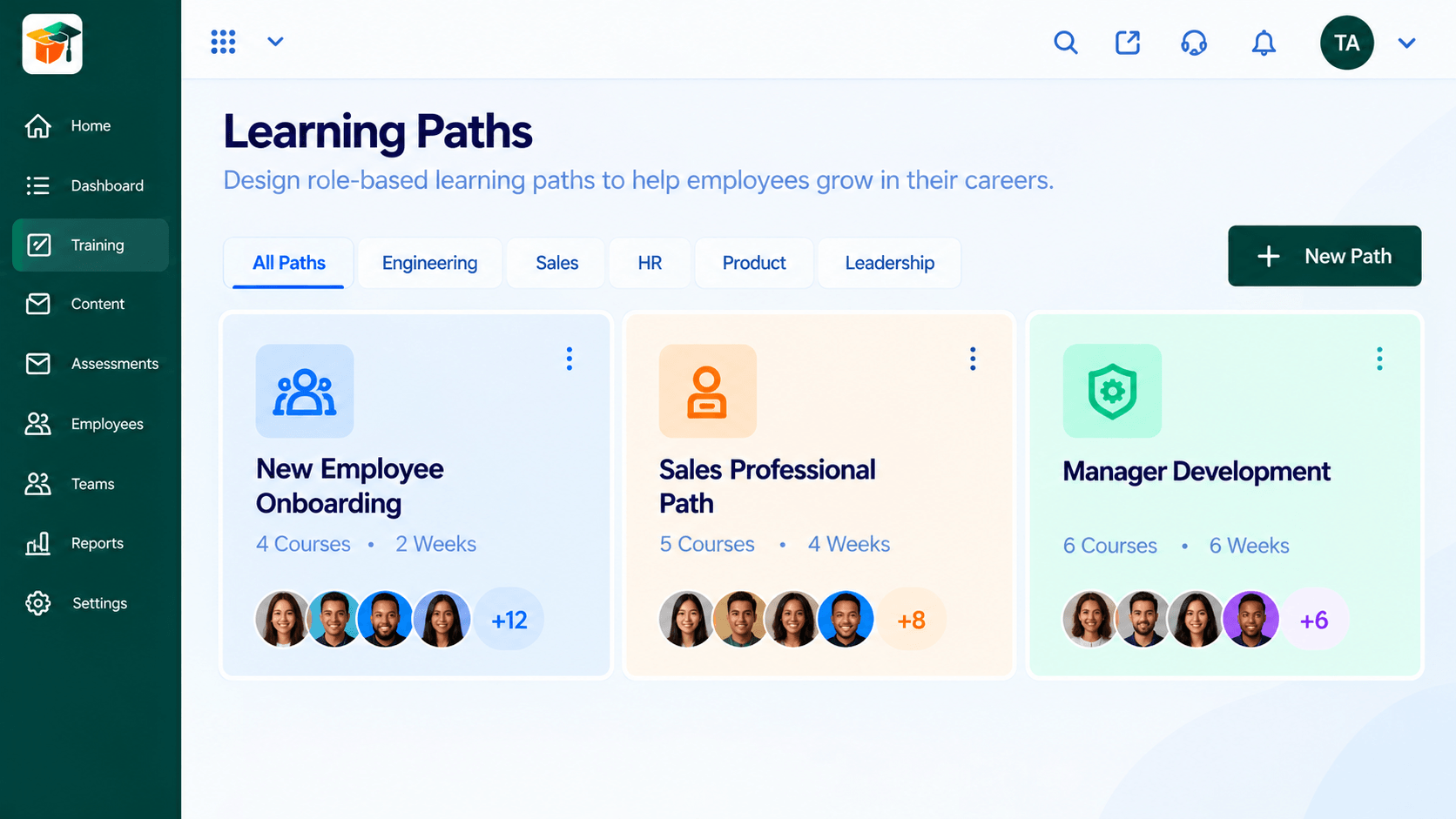
Triostack LMS lets you build courses and learning paths, then assign them automatically based on role, department, or onboarding stage — because it shares the same employee data as HRMS.
🔥 We have 250,000+ courses completed on Triostack LMS.
Works with
Assign training by role or department using data already in HRMS.
Track completion and certification status for required training.
Pair structured courses with HR onboarding so new hires ramp up faster.
Create a course with a title, description, category, and duration, then add videos, documents, quizzes, and real-world assignments in one place.
Group courses into paths for onboarding, sales, engineering, HR, product, or leadership. See each path's course count, duration, and enrolled learners at a glance.
Create rules that assign courses and learning paths to new employees, departments, managers, or teams. Switch a rule on or off, or edit it, without touching individual enrollments.
Define training programs with a code, category, and mode — in-person or online — then schedule sessions and enroll employees. Filter by name, category, or status: upcoming, ongoing, or completed.
Each employee sees assigned, in-progress, and completed courses with lesson progress and a clear next step — continue, start, or view the certificate.
Check what people have learned with quizzes, tests, and practical assignments. Set the number of questions, time limit, and pass score, and add multiple-choice questions as you go.
Track enrollments, completions, in-progress, and overdue training in one view. Filter by period, department, or program and watch the completion rate trend over time.
Issue certificates when an employee completes a course, then search, verify, and download them by employee, course, program, or status.
Keep reusable videos, documents, presentations, and links in one library. Search by type and reuse the same content across multiple courses.
Pair onboarding checklists in HRMS with structured learning paths.
Track required certifications and send renewal reminders automatically.
Give teams a consistent path to build and track new skills.
Because every app runs on the same platform, data moves between them without manual exports.
Built for these industries
Recommended for
Security
Single sign-on shared across the whole platform.
Control exactly who can see and edit data in LMS.
Data is protected in transit and at rest.
“Moving our sales and delivery teams onto one platform cut out a lot of the manual handoff work between CRM and project tracking.”
Start free today, or talk to our team about rolling out the full Business Suite.
Grow your business by building, referring, or reselling with Triostack.