The best Business Suite software in India, built to help your business grow. Contact us at +91-8882435276.
[ Contact ]
Phone number
Email address
Head office
Noida office
The right team at TriostackOne will get back to you.
Run professional email for your team, manage shared inboxes and keep conversations linked to the rest of your Business Suite. Designed specifically for ambitious growing companies who refuse to pay punitive per-seat enterprise taxes.
The Reality of Legacy Software
Free email accounts look amateur to enterprise prospects, while disconnected corporate inboxes isolate crucial client threads from the sales and support team.
When a team member leaves, customer correspondence and history disappear with their laptop.
Triostack Mail provides clean, domain-branded business email with shared team inboxes, unified contacts, and instant synchronization with CRM deals and support tickets.
“Triostack Mail gave us professional custom email on our own domain with shared mailboxes that let our sales and support teams collaborate effortlessly without forwarding messages around.”
Kavita Nair
Operations Lead • Nexus Logistics
Proven Reliability
SPF, DKIM & DMARC Enforced
AI-Powered Spam Shield 2026
Business Communication Index
TLS 1.3 & At-Rest Encryption
Software Evaluation
Create professional email addresses (you@yourdomain.com), manage shared addresses (sales@, info@, support@), and set centralized brand signatures across your organization.
Higher response rate from corporate buyers when emailing from a custom domain
Continuity of customer communications when staff transition or teams expand
You don't need a certified mail administrator to configure domain DNS records, create mailboxes, or set up forwarding aliases. Our guided setup completes in minutes.
Direct Competitor Comparison
Industry Research Finding
“Shared team inboxes reduce internal email forwarding and duplicate customer replies by over 50% compared to individual mail distribution lists.”
Set company-wide email footers, organize mail with smart folders, and link key client threads straight to active CRM deals.
Mainstream workspace giants frequently increase per-user mailbox fees and charge steep extras for archiving and storage tiers.
Lower total mailbox expenditure when bundled with the TriostackOne Business Suite
Visual Workflow Progression
Each step feeds the next automatically. Explore how Mail handles the whole journey on a single canvas.
Connect your domain and create mailboxes.
Shared inboxes let a team handle one address.
Signatures and templates keep messages consistent.
Email links to CRM and Desk records.
Head-to-Head Comparison
| Capability | Triostack Mail (Connected Suite) | Separate Disjointed Tools |
|---|---|---|
| Business inbox | Your domain, your mailboxes | Personal or shared accounts |
| Shared mailbox | Team access to one address | Shared passwords |
| Signatures | Standardised | Set up per person |
| Templates | Reusable email templates | Copied from documents |
| Customer link | Connected to CRM and Desk | Forwarded manually |
| Administration | One suite | A separate admin console |
Module Deep-Dive
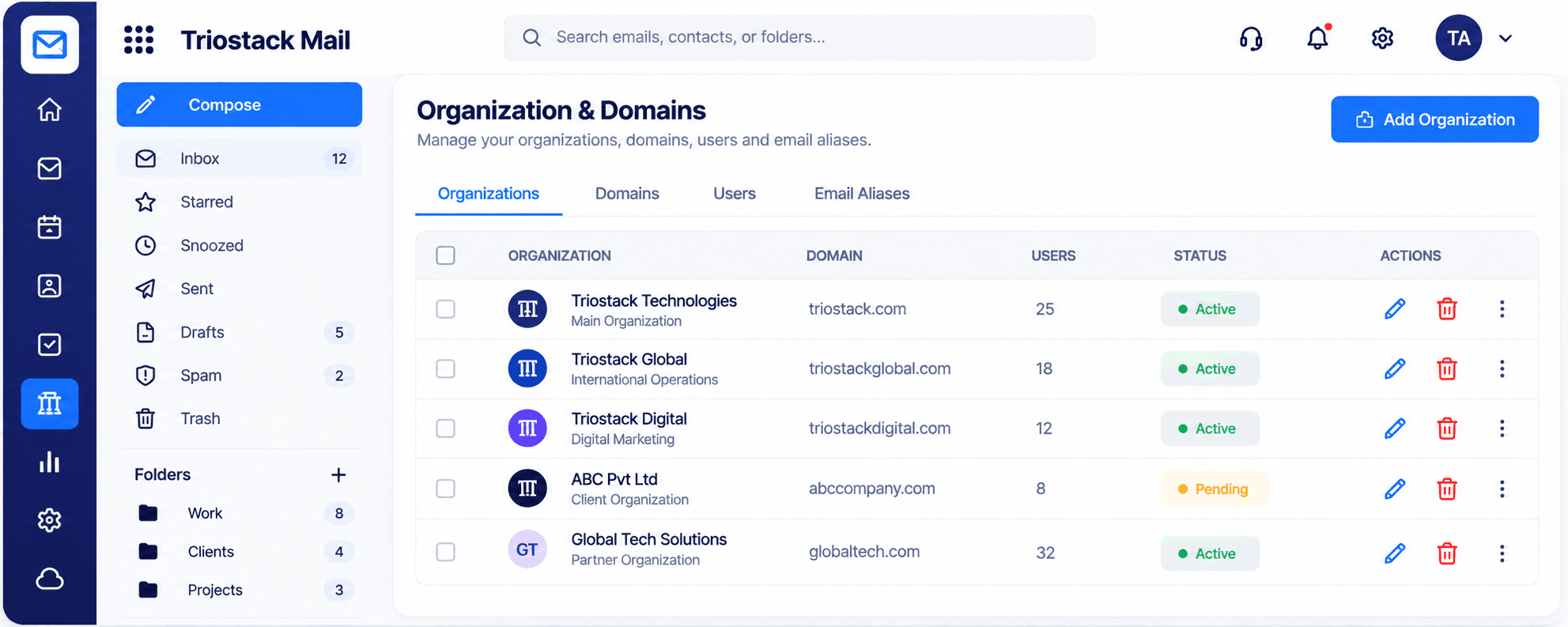
Add the organizations and domains your team sends from, manage the users on each, and set up email aliases. See every organization with its domain, user count, and active or pending status.
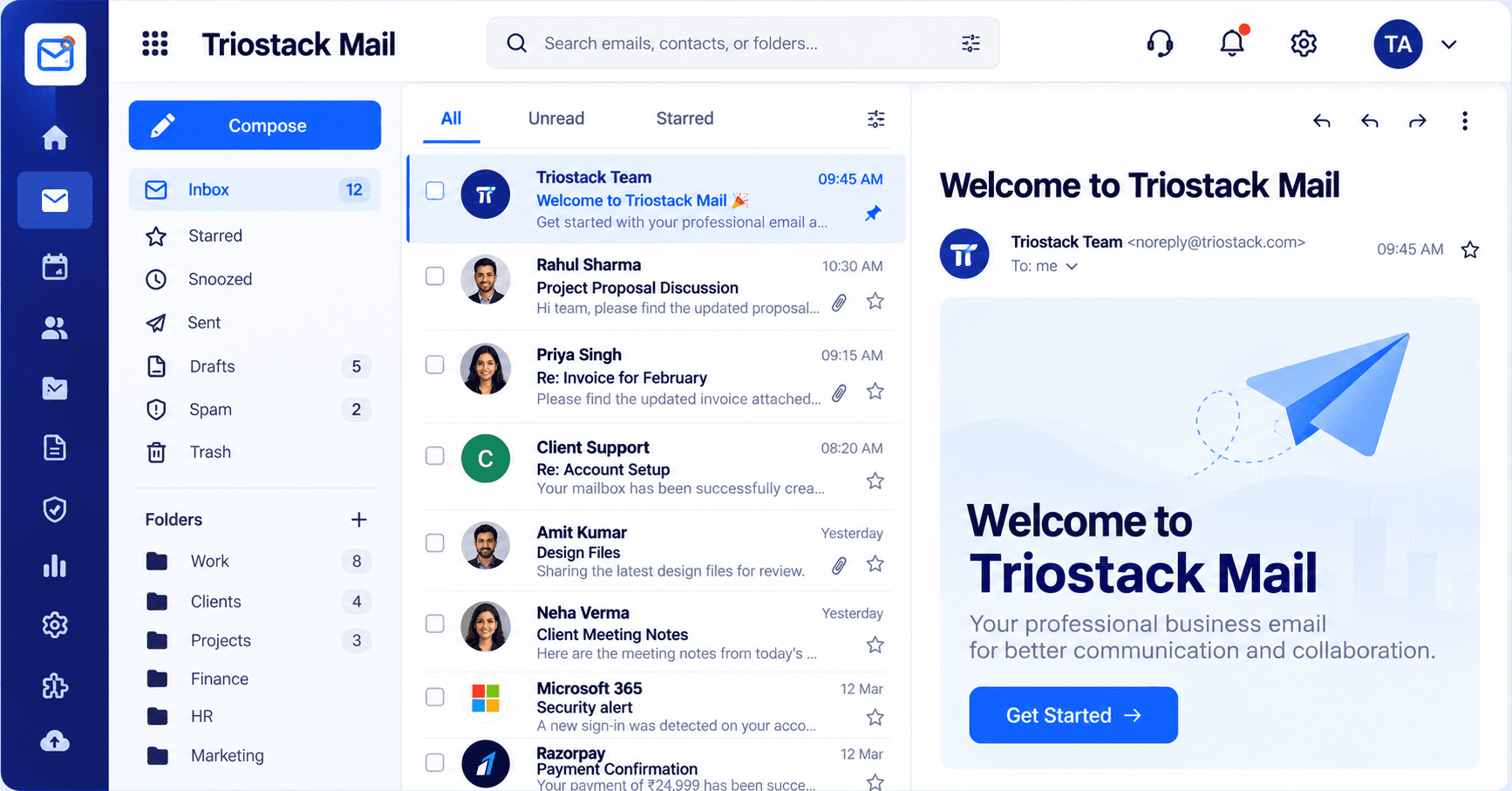
Work through email in a clean inbox with All, Unread, and Starred views. Read with attachments and pinned messages in the reading pane, and star or snooze anything you need to come back to.
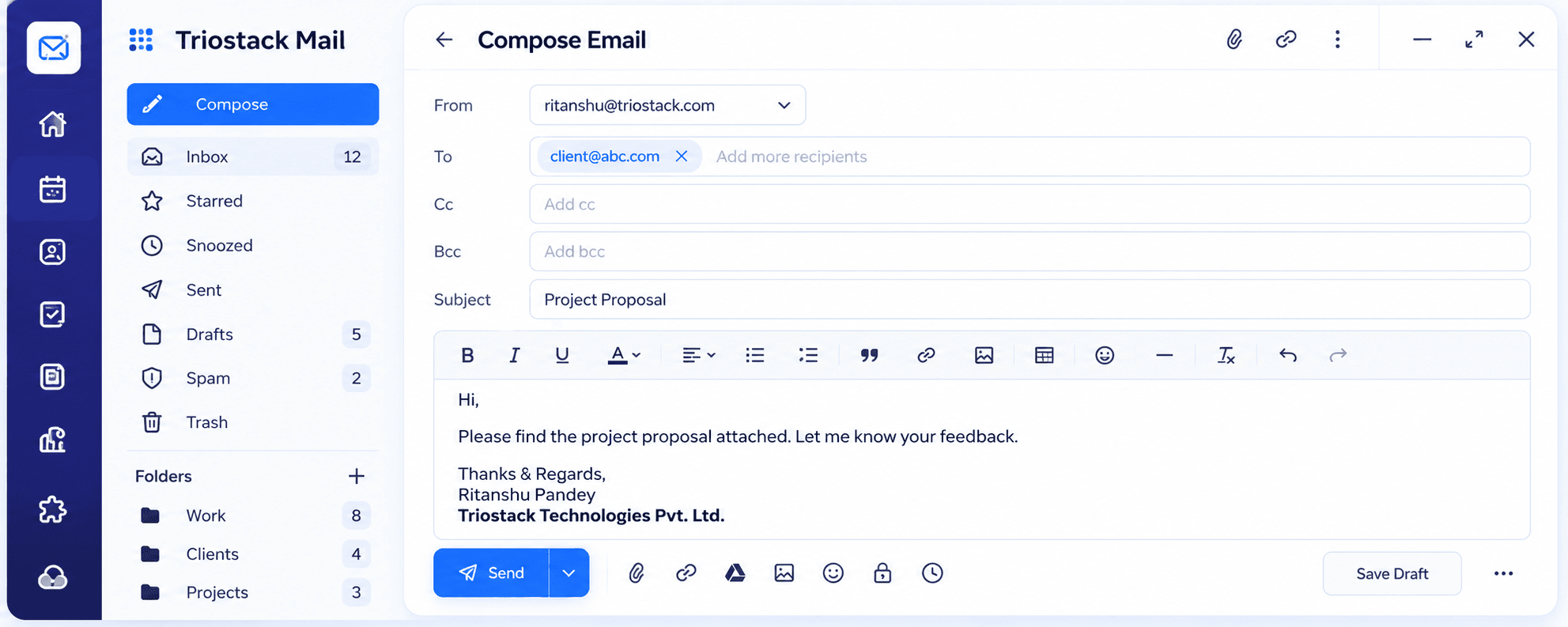
Write from any of your addresses with To, Cc, and Bcc, rich-text formatting, links, images, and tables. Attach files, schedule a send, protect a message, or save a draft and finish later.
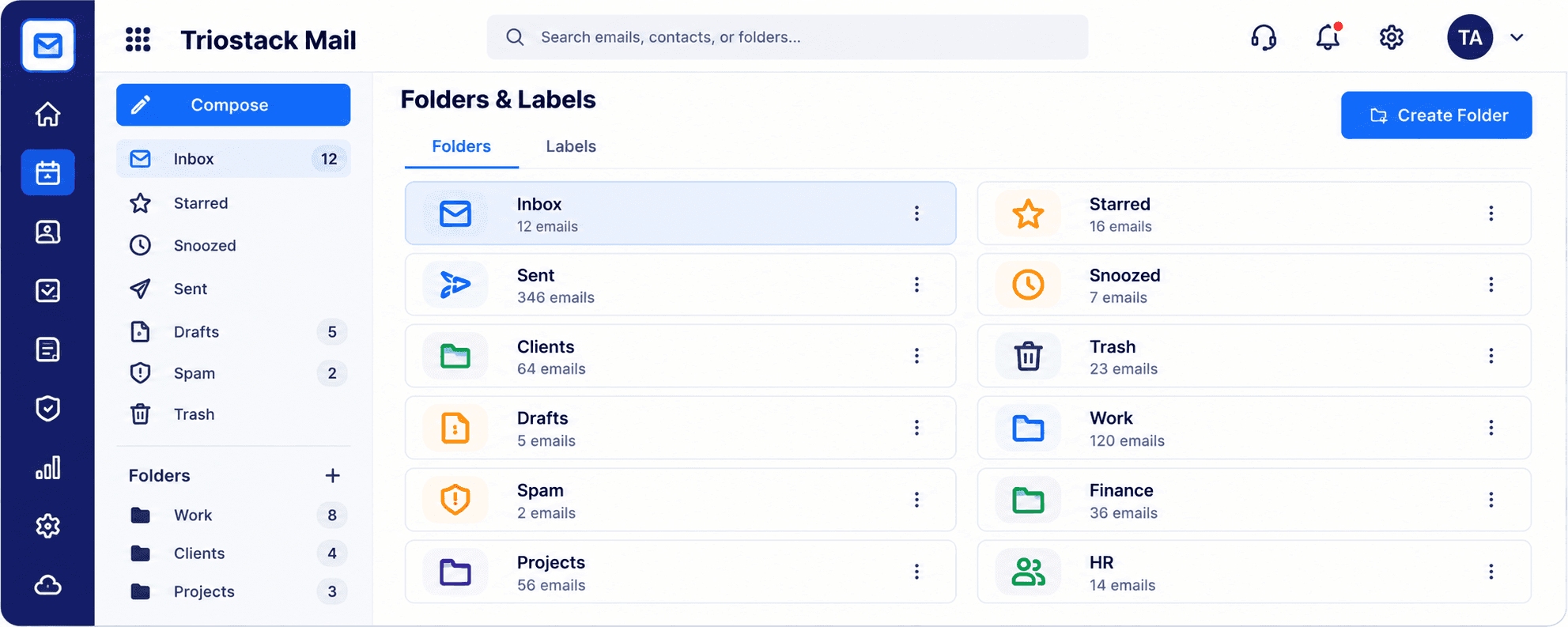
Organize mail into folders and labels, with counts for every one. Keep Clients, Work, Finance, HR, and Projects apart, and create a new folder in a click.
Keep every contact in one directory with name, email, company, and role. Search, edit, or remove contacts, and organize them by organization and group.
See safe emails, spam blocked, viruses blocked, and your protection rate for the month. Review recent activity such as blocked phishing, infected attachments, and new sign-ins, and manage the spam filter and blocked senders.
Set your display name, time zone, language, and date format, then add a signature, an auto reply, forwarding, and filters and rules so mail sorts itself.
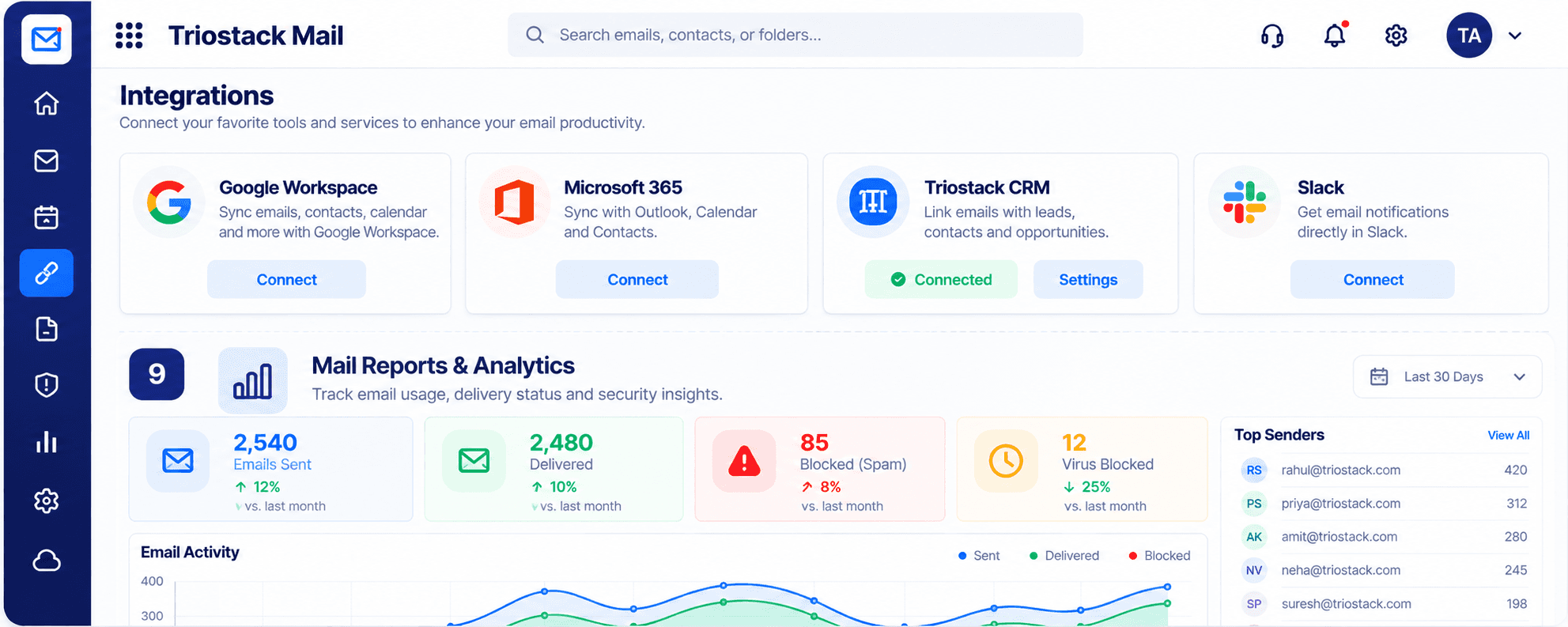
Connect Google Workspace, Microsoft 365, Triostack CRM, and Slack. Then track emails sent, delivered, and blocked over time, and see your top senders in one report.
Scenario 01
Run mail for one or several organizations on your own domains, with users and aliases managed centrally.
Scenario 02
Link emails with CRM leads, contacts, and opportunities so every reply starts with the full story.
Scenario 03
Block spam, phishing, and infected attachments, and review exactly what was stopped.
Clear Answers
Triostack Mail is built from the ground up for modern growing teams. Unlike fragmented point tools that charge per user and require multiple integrations, Triostack Mail provides transparent pricing, intuitive daily workflows, and native real-time sync with customer accounts, billing, and support.
Triostack Mail includes organizations, domains & aliases, inbox & reading pane, compose with a full editor, folders & labels, contacts & groups, security & spam protection, signatures, auto reply & rules, integrations & reports. There are no hidden paywalls or surprise add-ons to access essential reporting and export features.
Yes. Mail natively shares data with Triostack CRM, Triostack Desk, Google Workspace, Microsoft 365, Slack, ensuring customer information, project updates, and financial logs stay identical without manual exports.
Absolutely. You can subscribe to Mail individually to solve your immediate operational needs, then turn on additional Business Suite applications whenever your team is ready—no migrations or separate contract renegotiations required.
Free plan with usage limits. Our team provides guided CSV/Excel import tools, step-by-step onboarding walkthroughs, and responsive technical support to get your entire staff up and running in days, not months.
Free plan with usage limits. Experience seamless workflows with zero seat penalties and free migration support.
Explore More Workflows in “Run Your Business”
