The best Business Suite software in India, built to help your business grow. Contact us at +91-8882435276.
[ Contact ]
Phone number
Email address
Head office
Noida office
The right team at TriostackOne will get back to you.
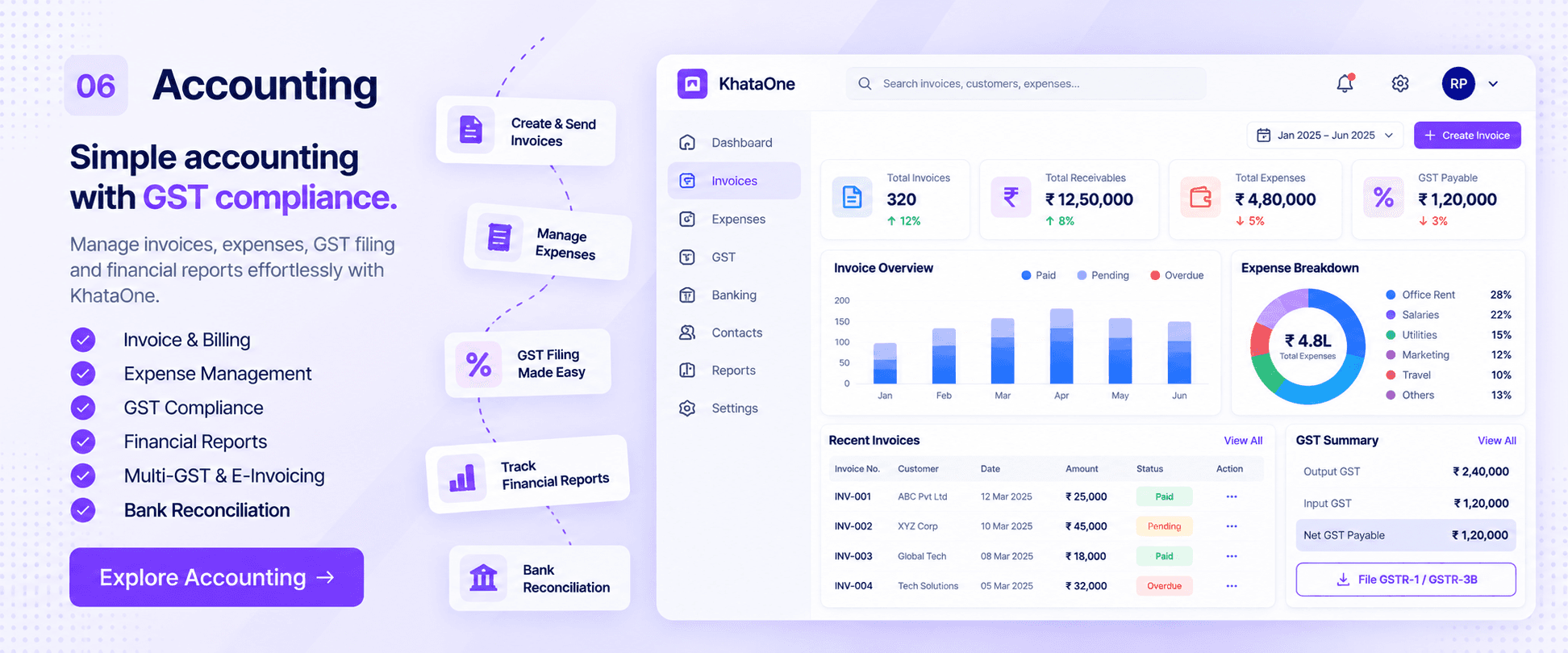
Create invoices, record expenses and follow payments, with payroll and sales feeding straight into your books. Designed specifically for ambitious growing companies who refuse to pay punitive per-seat enterprise taxes.
The Reality of Legacy Software
Standalone accounting packages force you to re-type sales invoices, manually record payroll entries, and reconcile bank statements in isolation.
Business owners end up flying blind, waiting weeks for external accountants to compile monthly profit-and-loss reports.
Triostack Finance connects invoicing, expense tracking, payroll journals, and tax reconciliation into one live financial dashboard.
“Triostack Finance transformed our cash flow management. Sales deals in CRM turn into invoices instantly, payments update the client's account automatically, and tax reconciliation is a breeze.”
Aman Singhal
Managing Director • Horizon Retail Systems
Proven Reliability
FinTech Excellence Awards 2026
Cash Flow & Receivables Index
Statutory Reporting Certified
256-Bit Ledger Security Vault
Software Evaluation
Manage multiple business entities, handle multi-currency quotations, and organize vendor bills and employee reimbursements with complete audit trails.
Faster invoice creation when generated directly from CRM lead records
Accuracy in automatic payment reconciliation and general ledger syncing
You shouldn't need a master's degree in accounting just to see your monthly revenue or understand which clients are past due. Triostack Finance makes money matters crystal clear.
Direct Competitor Comparison
Industry Research Finding
“Disconnected financial tools cause 82% of small business cash flow surprises due to delayed invoice dispatch and overlooked receivables.”
Custom logo headers, itemized discounts, tax breakdowns, and automated recurring invoices for retainer clients.
Traditional accounting software charges extra for additional users, invoicing tiers, and payroll synchronization.
Savings compared to standalone accounting subscriptions with separate connector fees
Visual Workflow Progression
Each step feeds the next automatically. Explore how Finance handles the whole journey on a single canvas.
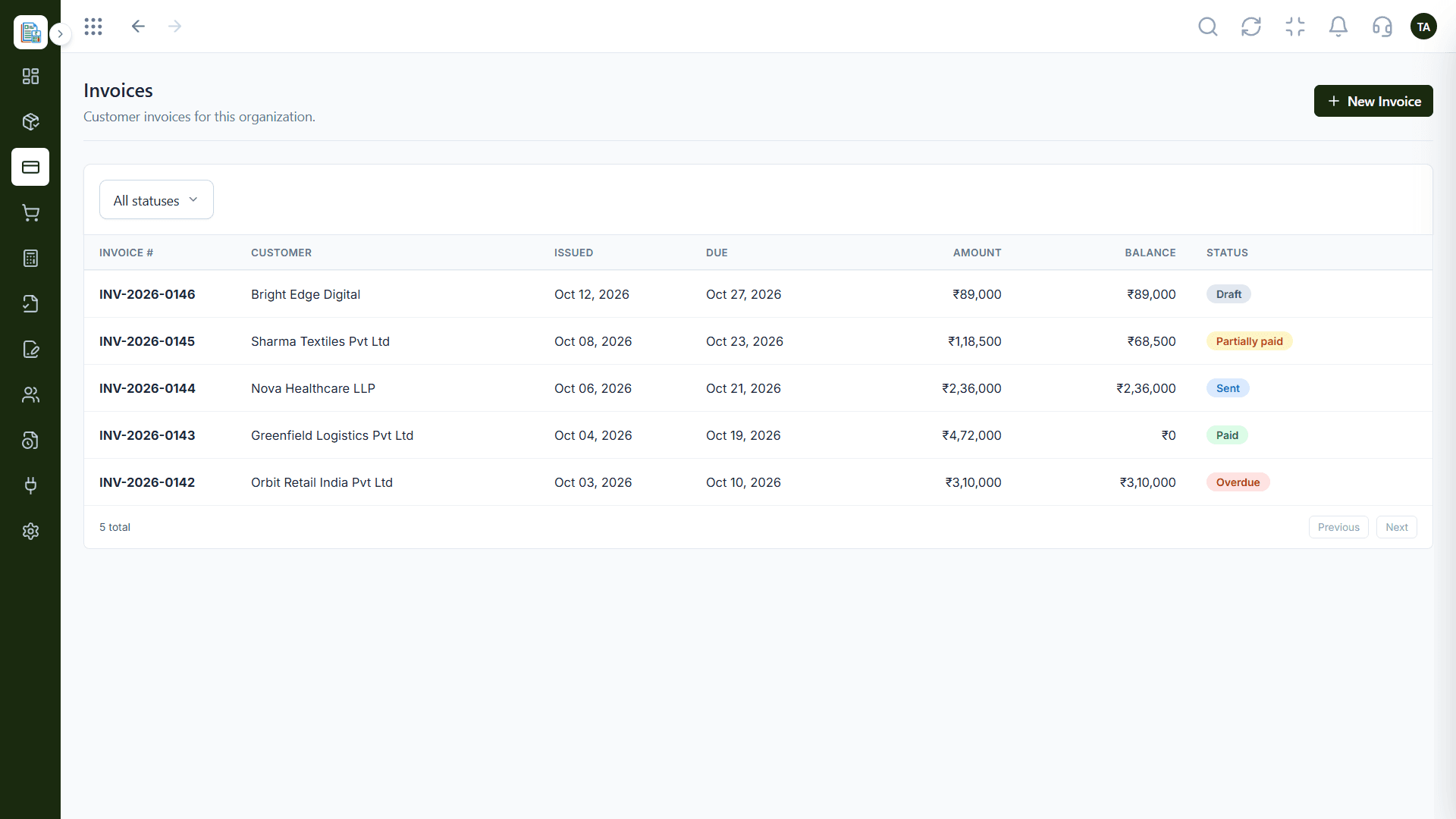
Create and send invoices from customer records.
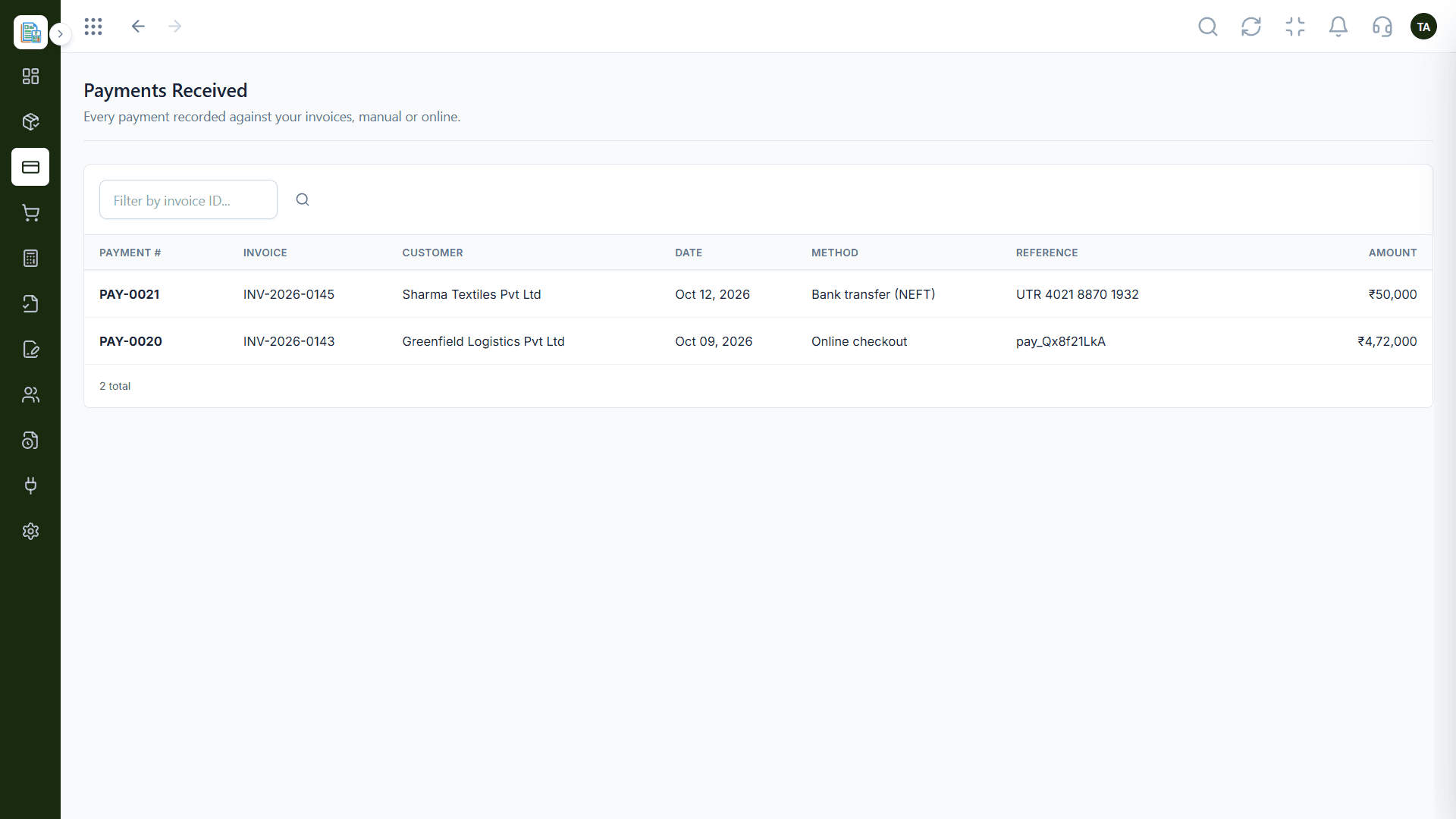
Track what's paid, partly paid and overdue.
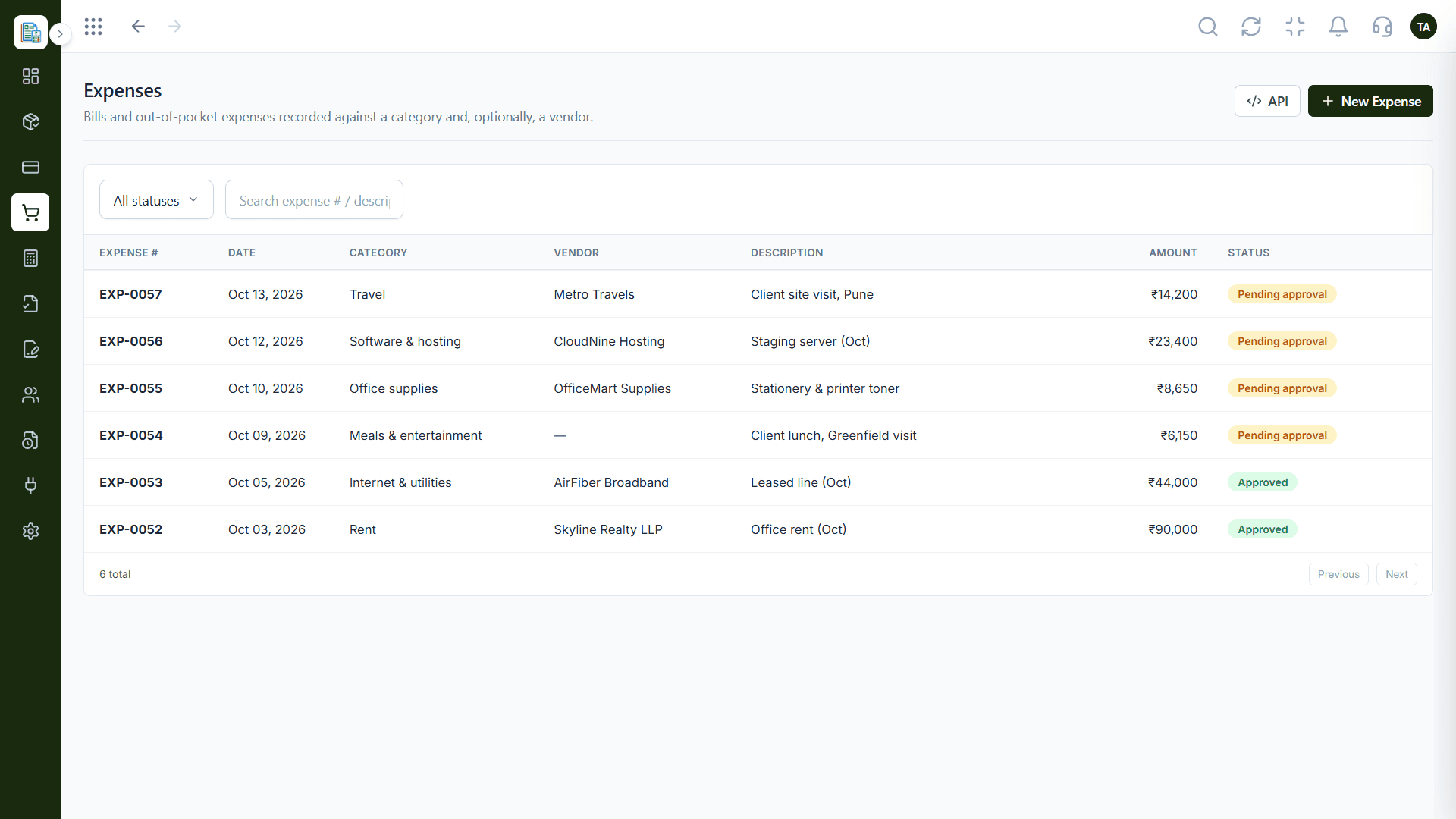
Record and categorise expenses.
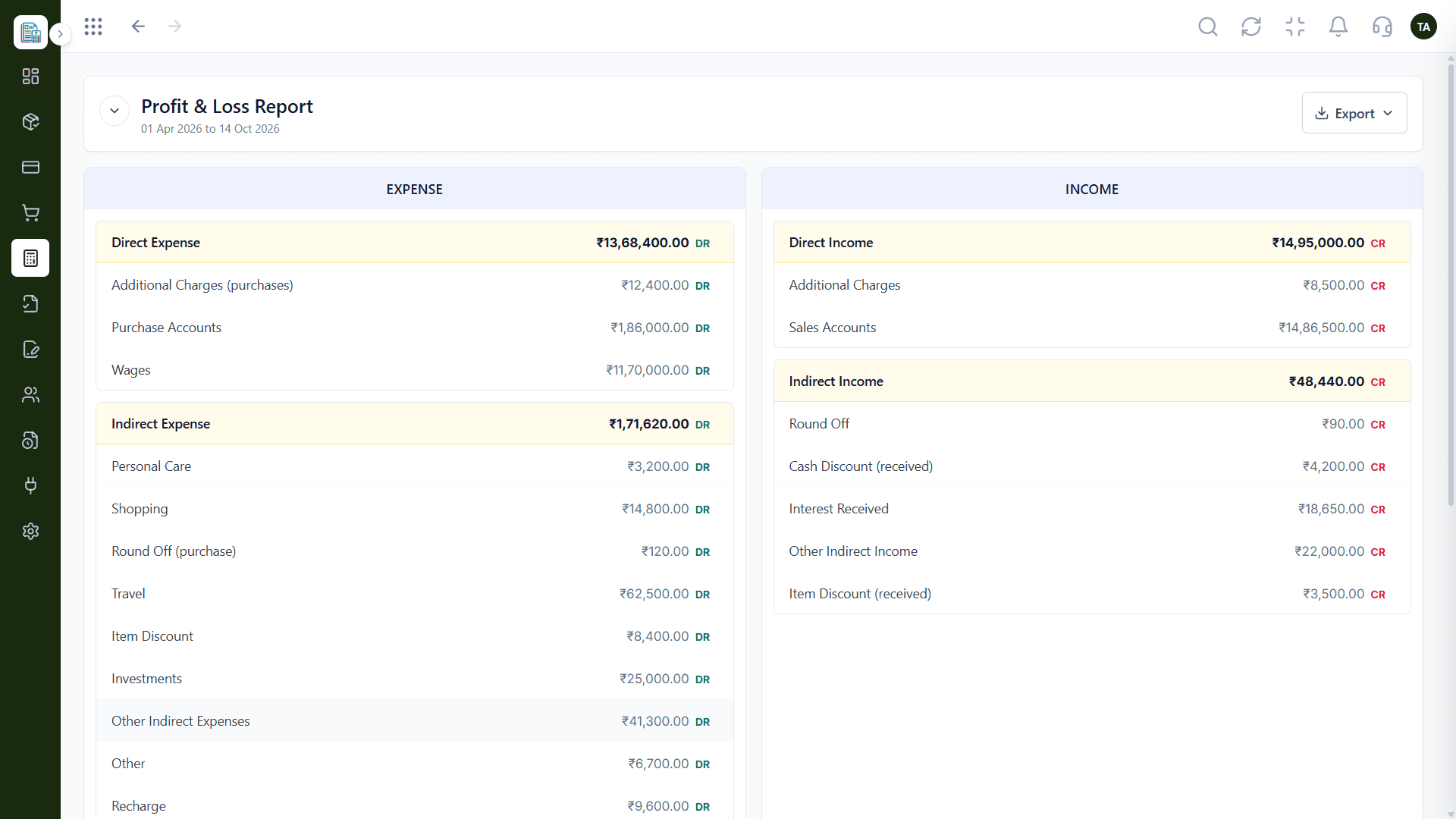
See financial reports across your entities.
Head-to-Head Comparison
| Capability | Triostack Finance (Connected Suite) | Separate Disjointed Tools |
|---|---|---|
| Invoicing | From the customer record | Re-typed in a billing tool |
| Payment tracking | Status per invoice | Reconciled manually |
| Expenses | Recorded and categorised | Receipts in folders |
| Payroll link | Synced from Payroll | Manual journal entries |
| Entities | Multi-entity support | Separate files |
| Reports | Built-in financial reports | Spreadsheets |
Module Deep-Dive
See outstanding, overdue, and draft invoices, the amount due, payments received, and open quotations on one live dashboard. Track expenses, pending approvals, and net cash flow beside revenue, with an invoice mix by payment status.
Create customer invoices and filter them by status. Send them to the customer, mark them as paid, or collect payment online, and keep a recurring schedule for customers you bill every month.
Send customer quotations before the work starts and follow each one by status until it's accepted, then turn it into an invoice.
Prepare customer proposals for your organization, track where each one stands, and keep them next to the quotations and invoices that follow.
Keep every customer in one directory. Search by name, email, phone, or code, add customers one at a time, or import them in bulk.
Catalogue the products and services you sell for your organization's brand. Search by name or SKU and filter by brand and status so invoice lines stay consistent.
See every payment recorded against your invoices, whether marked as paid manually or collected through online checkout. Filter by invoice ID to reconcile quickly.
Issue accounting adjustments to a customer, optionally linked to the invoice they correct, and filter them by status.
Document the movement of goods without an invoice — job work, branch transfers, returnable material, and more — and track each challan by status.
Record bills and out-of-pocket expenses against a category and, optionally, a vendor. Search by expense number or description, filter by status, and send each one through approval before it hits the books.
Maintain a vendor directory for your organization and search it by name or code, so every bill and payment goes to the right party.
Set up schedules that automatically generate expense bills for a category or vendor on a recurring basis, and filter them by status.
Set your company logo and brand name once, then add a custom header and footer to every invoice. Addresses, company info, communication, and working hours are shared across every Triostack product.
Start with a complete chart of accounts — assets, liabilities, income, expenses, and equity, including GST input and output ledgers. Search, sort, create accounts, and export to CSV.
Post double-entry journals for adjustments. Drafts never affect balances, posted journals can only be reversed, and you can lock the books once a financial year is finalised and filed.
See every posted journal line with a running balance. Filter by financial year, date range, account, party, source type, and status, search by voucher or narration, and include reversed entries when you need the full trail.
Read income and expenses side by side, split into direct and indirect, for any period. Export the report when your accountant or auditor asks for it.
See liabilities and assets as of any date, grouped into capital, current liabilities, current assets, and fixed assets, with debit and credit balances for every account.
Match the GSTR-2B your suppliers filed against your purchase register, month by month, and work through mismatches from a case queue.
Post every approved pay run from Triostack Payroll to Salaries & Wages in the general ledger automatically. See when each cycle last synced and reconcile the last three pay runs, so personnel cost in your Profit & Loss stays accurate without manual exports.
Keep an activity history for your organization's finance data, with date and time, action, module, actor, and description. Filter by module, action, or date range.
Scenario 01
Generate invoices directly from CRM deals without manual re-entry.
Scenario 02
See project cost and margin using connected delivery and payroll data.
Scenario 03
Simplify monthly close using financial data already connected across the suite.
Clear Answers
Triostack Finance is built from the ground up for modern growing teams. Unlike fragmented point tools that charge per user and require multiple integrations, Triostack Finance provides transparent pricing, intuitive daily workflows, and native real-time sync with customer accounts, billing, and support.
Triostack Finance includes invoicing dashboard, invoices, quotations, proposals, customers, products & services, payments received, credit notes, delivery challans, expense management, vendors, recurring expenses, invoice branding & company settings, chart of accounts, manual journals, general ledger, profit & loss report, balance sheet, gstr-2b reconciliation, payroll cost sync, audit logs. There are no hidden paywalls or surprise add-ons to access essential reporting and export features.
Yes. Finance natively shares data with Triostack CRM, Triostack Payroll, Triostack Projects, ensuring customer information, project updates, and financial logs stay identical without manual exports.
Absolutely. You can subscribe to Finance individually to solve your immediate operational needs, then turn on additional Business Suite applications whenever your team is ready—no migrations or separate contract renegotiations required.
Free plan with usage limits. Our team provides guided CSV/Excel import tools, step-by-step onboarding walkthroughs, and responsive technical support to get your entire staff up and running in days, not months.
Free plan with usage limits. Experience seamless workflows with zero seat penalties and free migration support.
Explore More Workflows in “Run Your Business”
