The best Business Suite software in India, built to help your business grow. Contact us at +91-8882435276.
[ Contact ]
Phone number
Email address
Head office
Noida office
The right team at TriostackOne will get back to you.

Positioning Assessment
A WhatsApp-integrated CRM should use the official API, let several agents share a number and keep every chat on the lead. Check whether templates are managed inside the CRM, how a chat is assigned, whether automation can trigger messages, and what happens to chat history when an agent leaves.
Triostack CRM uses the WhatsApp Cloud API for a shared team inbox, Meta-approved templates, automation triggers on stage changes and form fills, and the full chat on the lead. We do not rank vendors or call any CRM "top" on a list, because the right one depends on your team. Use the checklist, trial it on your own leads and compare current plans.
“We tested what happened when an agent left. The chat history stayed with the lead.”
Sample team scenario
Illustrative example, not a customer testimonial

WhatsApp Automation
Trigger template messages on stage changes and form fills
In the Product
Imagine judging a tool by watching it do your Tuesday, not by reading about its best day.
Six points, same for every vendor.
Not a demo account.
Ask a real question.
Platform Integrity
Judge on the work you do
WhatsApp, SIM calls, GST
Decide on evidence
Test how they answer
At a Glance
Six things to check in any CRM, including ours.
| Dimension | Triostack CRM | What to Look For |
|---|---|---|
| Official API | WhatsApp Cloud API, with templates approved by Meta | The official API, not an unofficial workaround |
| Shared inbox | Multi-agent inbox with assignment and notes | Several agents on one number |
| Messaging | WhatsApp Cloud API shared inbox in the CRM | WhatsApp built in, not bolted on |
| Calling | Android SIM calling with logs on the lead | Phone calls logged on the record |
| Invoicing | Quotations and GST invoices from a deal | Billing that suits India |
| Pricing | See our pricing page | Total cost for your team |
Book a walkthrough and we will set up a sandbox with sample leads, a WhatsApp inbox and a pipeline, so you can try it before you commit.
Live Interface Tour
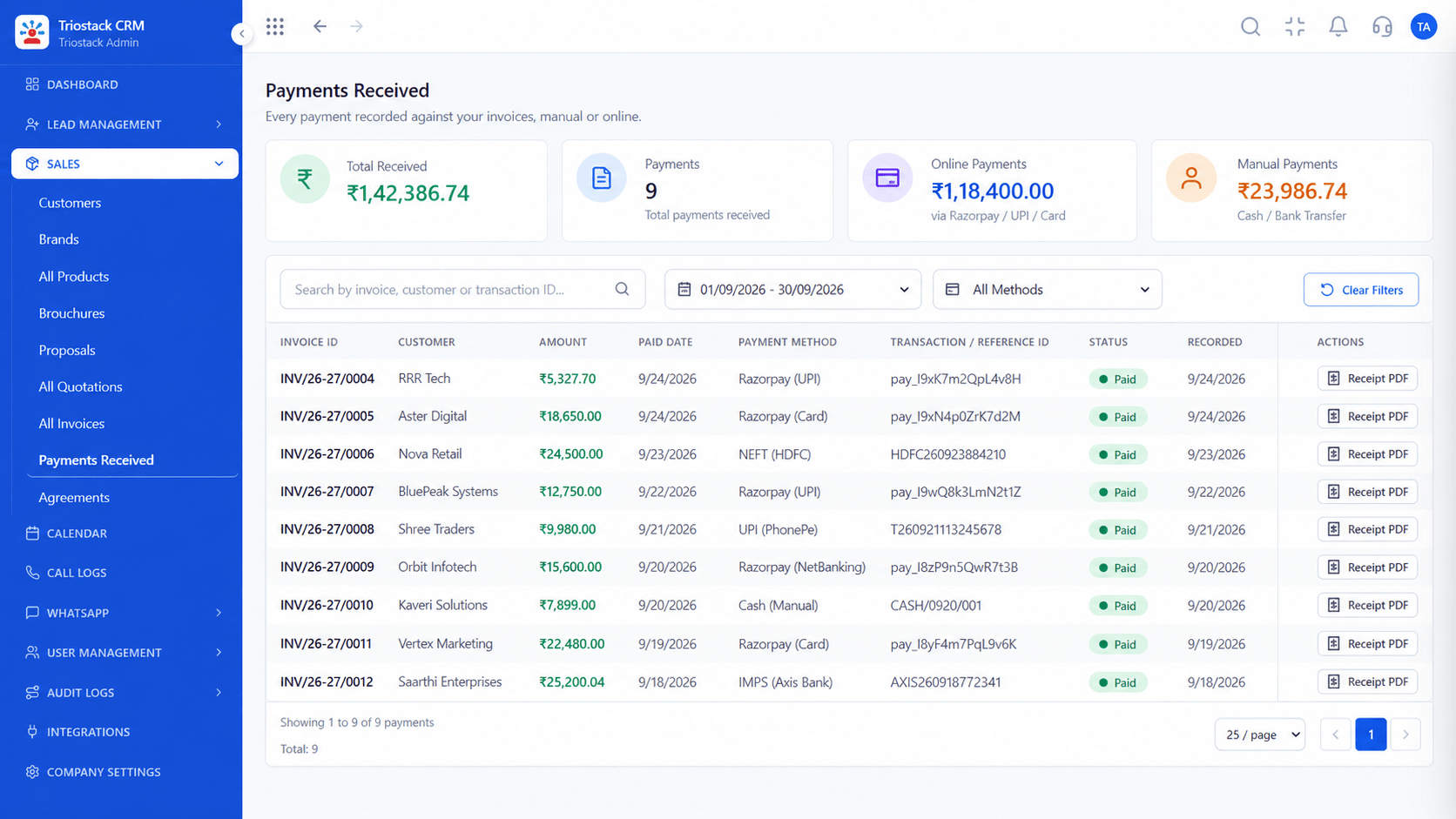
Real screens captured directly from the production Triostack CRM interface.
WhatsApp Team Inbox
A checklist for judging any CRM for teams that sell on WhatsApp
Feature Breakdown
Captured directly from the production Triostack CRM interface.
Where deals are talked through.
On this screen: Shared conversations with customer context beside them.
How it fits the plan
Write needs. List the five things you cannot do without.
Shortlist. Pick two or three CRMs.
Practical tip
Ask each vendor whether the integration uses the official Cloud API. It affects reliability and your number's safety.
Templates that send themselves.
On this screen: Trigger template messages on stage changes and form fills.
How it fits the plan
Shortlist. Pick two or three CRMs.
Trial. Use your own leads in each.
In real life
Sales on WhatsApp
Chats and deals sit together.

Every source in one list.
On this screen: Every lead with its source, status and owner.
How it fits the plan
Trial. Use your own leads in each.
Decide. Weigh support as much as features.
Watch out for
Choosing a tool that uses a workaround, and risking the business number.

Nothing slips.
On this screen: Never miss the next call or message.
How it fits the plan
Decide. Weigh support as much as features.
Write needs. List the five things you cannot do without.
Before you start
Execution Plan
List the five things you cannot do without.
Pick two or three CRMs.
Use your own leads in each.
Weigh support as much as features.
Practical Guide
Before you start
A tip that helps
Ask each vendor whether the integration uses the official Cloud API. It affects reliability and your number's safety.
A common mistake
Choosing a tool that uses a workaround, and risking the business number.
In Real Life
Scenario 01
Chats and deals sit together.
Scenario 02
History stays when an agent leaves.
Scenario 03
Templates go out from the CRM.
Straight answers about Top WhatsApp Integrated CRM Software, from setup to what happens next.
Have a question about Top WhatsApp Integrated CRM Software?
Book a free callWe do not grade ourselves. Use the checklist, trial it on your own leads and compare it with the others you shortlist.
Yes. It uses the WhatsApp Cloud API, with Meta-approved templates.
Yes. Every CRM module is available on the free trial.
On our CRM pricing page, which shows the current plans.
What makes a strong CRM for teams that sell on WhatsApp? A practical checklist to judge any CRM, and where Triostack CRM fits. We do not rank vendors; trial it on your own leads.
It runs in 4 steps: Write needs, Shortlist, Trial and Decide. List the five things you cannot do without.
The real screens on this page include WhatsApp Automation, Lead Follow-Ups, All Leads and WhatsApp Team Inbox, all captured from the product.
Request a demo or start a free trial. Our team can also walk you through a guided setup, so your first session ends with something working.
Keep Exploring
Unify Meta leads, WhatsApp conversations, Android SIM calls, and GST invoices without per-seat price taxes.
Explore All CRM Guides