The best Business Suite software in India, built to help your business grow. Contact us at +91-8882435276.
[ Contact ]
Phone number
Email address
Head office
Noida office
The right team at TriostackOne will get back to you.
Positioning Assessment
Teams call in different ways: from Android SIMs, through cloud telephony providers, or over a PBX they already own. Whatever the route, the useful part is the same: the call should appear on the lead.
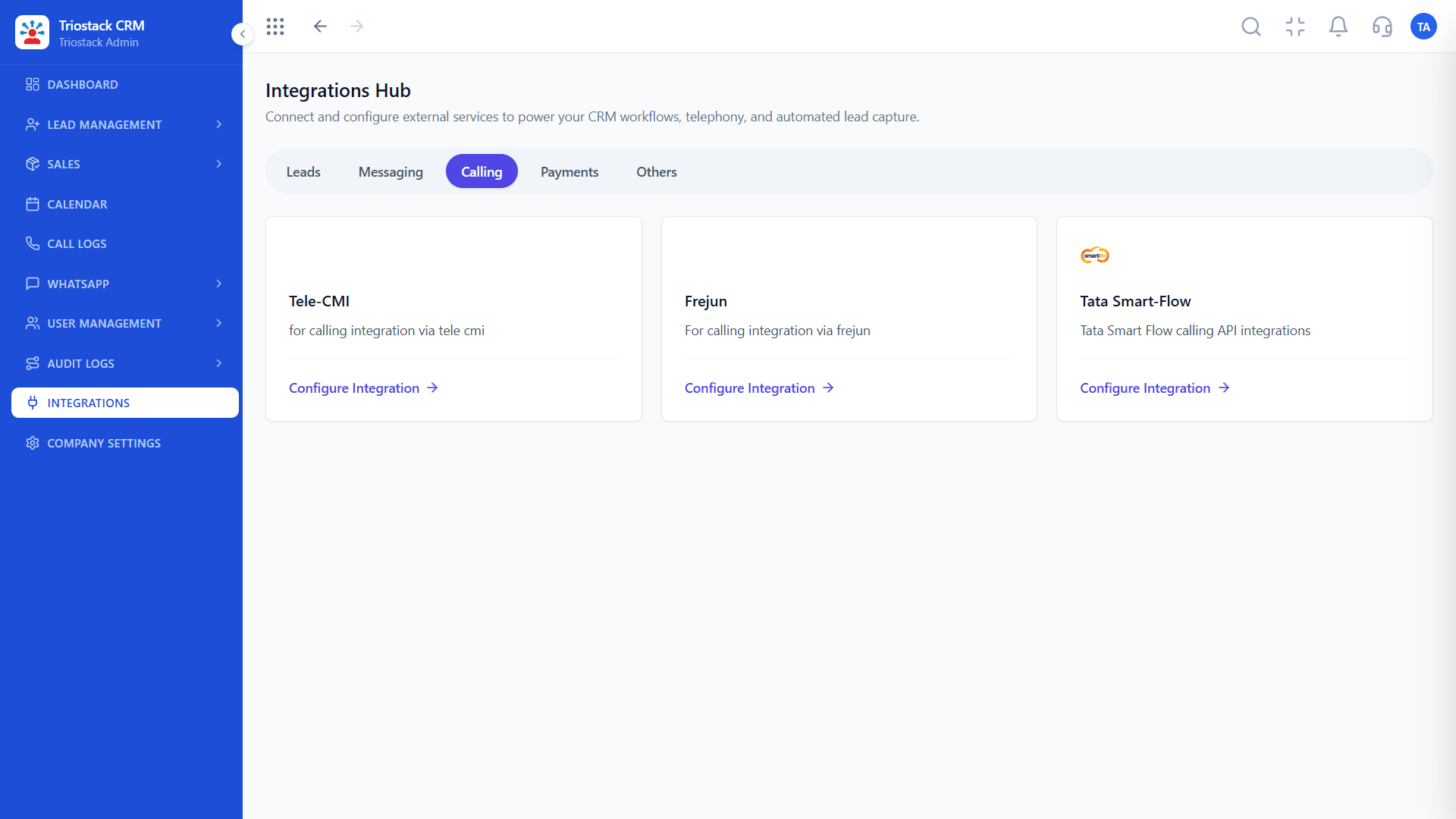
Triostack CRM logs Android GSM calls on the lead with duration and outcome. The Integrations Hub also lists calling providers, including Tele-CMI, Frejun and Tata Smart-Flow, so calls placed through them can be tied to the CRM. If you have your own PBX or VoIP gateway, ask us what connection is possible.
We will tell you what is supported and what would need work.
“Calls from the PBX and from phones now sit on the same timeline.”
Sample team scenario
Illustrative example, not a customer testimonial

Lead Pipeline
Drag deals across your own sales stages
In the Product
Imagine every call ending with its record already filed.
Calls and chats together.
Phone or provider.
We say what is possible.
Platform Integrity
Android SIM, logged
Tele-CMI, Frejun, Tata Smart-Flow
From the lead
Ask us
At a Glance
What changes when calls reach the CRM.
| Dimension | Triostack CRM | Separate Call Logs |
|---|---|---|
| Call log | On the lead | In a phone or PBX report |
| Duration and outcome | Recorded | Partly or not |
| Dialling | From the lead | Copy the number |
| Providers | Listed in Integrations | Unconnected |
| Own PBX | Ask us what is possible | Manual |
Book a walkthrough and we will set up a sandbox with sample leads, a WhatsApp inbox and a pipeline, so you can try it before you commit.
Live Interface Tour
Real screens captured directly from the production Triostack CRM interface.
Calling Integrations
Logged with duration and outcome
Feature Breakdown
Captured directly from the production Triostack CRM interface.
01
CRMProvider connections.
On this screen: Calling providers connected from the Integrations Hub.
How it fits the plan
Choose. Pick Android calling or a provider.
Connect. Configure it in the Integrations Hub.
Practical tip
Test with one rep first. A single call logged end to end shows you everything that needs fixing.

02
CRMCalls on the lead.
On this screen: Calls from Android phones logged against the lead.
How it fits the plan
Connect. Configure it in the Integrations Hub.
Test. Place a call and check the log.
In real life
Call centre
Provider calls land on leads.

03
CRMNext call, on time.
On this screen: Never miss the next call or message.
How it fits the plan
Test. Place a call and check the log.
Roll out. Give reps the click-to-dial workflow.
Watch out for
Rolling out a new calling route to the whole team before testing a single call.

04
CRMWhere calls attach.
On this screen: Every lead with its source, status and owner.
How it fits the plan
Roll out. Give reps the click-to-dial workflow.
Choose. Pick Android calling or a provider.
Before you start
Execution Plan
Pick Android calling or a provider.
Configure it in the Integrations Hub.
Place a call and check the log.
Give reps the click-to-dial workflow.
Practical Guide
Before you start
A tip that helps
Test with one rep first. A single call logged end to end shows you everything that needs fixing.
A common mistake
Rolling out a new calling route to the whole team before testing a single call.
Availability: Availability can depend on your plan and setup. Please confirm with our team which capabilities are live for your account, and any prerequisites, before you plan around this page.
In Real Life
Scenario 01
Provider calls land on leads.
Scenario 02
Phone calls log themselves.
Scenario 03
Every route reaches the record.
Straight answers about Custom Telephony and PBX Gateway, from setup to what happens next.
Have a question about Custom Telephony and PBX Gateway?
Book a free callYes. Android GSM calls are logged on the lead with duration and outcome.
The Integrations Hub lists Tele-CMI, Frejun and Tata Smart-Flow. Ask us what is live on your plan.
Ask us. We will tell you what is supported for your setup.
Ask us about recording options and the rules that apply to your use.
Explain connectivity between custom PBX, VoIP and GSM gateways with Triostack CRM for click-to-dial and call logs.
It runs in 4 steps: Choose, Connect, Test and Roll out. Pick Android calling or a provider.
The real screens on this page include Lead Pipeline, Sales Dashboard, Lead Assignment and Calling Integrations, all captured from the product.
Request a demo or start a free trial. Our team can also walk you through a guided setup, so your first session ends with something working.
Keep Exploring
Unify Meta leads, WhatsApp conversations, Android SIM calls, and GST invoices without per-seat price taxes.