The best Business Suite software in India, built to help your business grow. Contact us at +91-8882435276.
[ Contact ]
Phone number
Email address
Head office
Noida office
The right team at TriostackOne will get back to you.

Start
Send store enquiries through the website webhook.
Route
Assign each lead to an owner.
List
Write down the order data you want on the timeline.
Ask
Scope anything beyond the webhook with our team.
Positioning Assessment
Online stores want abandoned-cart enquiries, purchase history and fulfilment status to appear on the customer's CRM timeline, so a salesperson or support agent sees the whole picture before replying.
Shopify and WooCommerce are not among the connections listed in the CRM's Integrations Hub. What is listed is a Website Webhook for bringing leads and form submissions in, which a store could use for enquiries and sign-ups. Anything beyond that, such as order history or fulfilment tracking on a timeline, would be a custom engagement agreed with our team. This page does not promise cart recovery or order sync.
“We started with enquiry forms through the webhook. Order history was a second step.”
Sample team scenario
Illustrative example, not a customer testimonial

Lead Pipeline
Drag deals across your own sales stages
In the Product
Imagine every enquiry from the shop landing on the right desk.
Website webhook.
Custom engagement.
Get specific answers.
Platform Integrity
Listed today
Into the CRM
Custom engagement
Not claimed
At a Glance
What exists now and what would need scoping.
| Dimension | Triostack CRM | Full Store Sync |
|---|---|---|
| Enquiries and sign-ups | Via the website webhook | Part of a larger sync |
| Purchase history | Custom engagement | Part of a larger sync |
| Fulfilment tracking | Ask our team | Part of a larger sync |
| Abandoned carts | Not claimed here | Often expected |
| Status | Webhook listed; store sync not | Not applicable |
Book a walkthrough and we will set up a sandbox with sample leads, a WhatsApp inbox and a pipeline, so you can try it before you commit.
Live Interface Tour
Real screens captured directly from the production Triostack CRM interface.
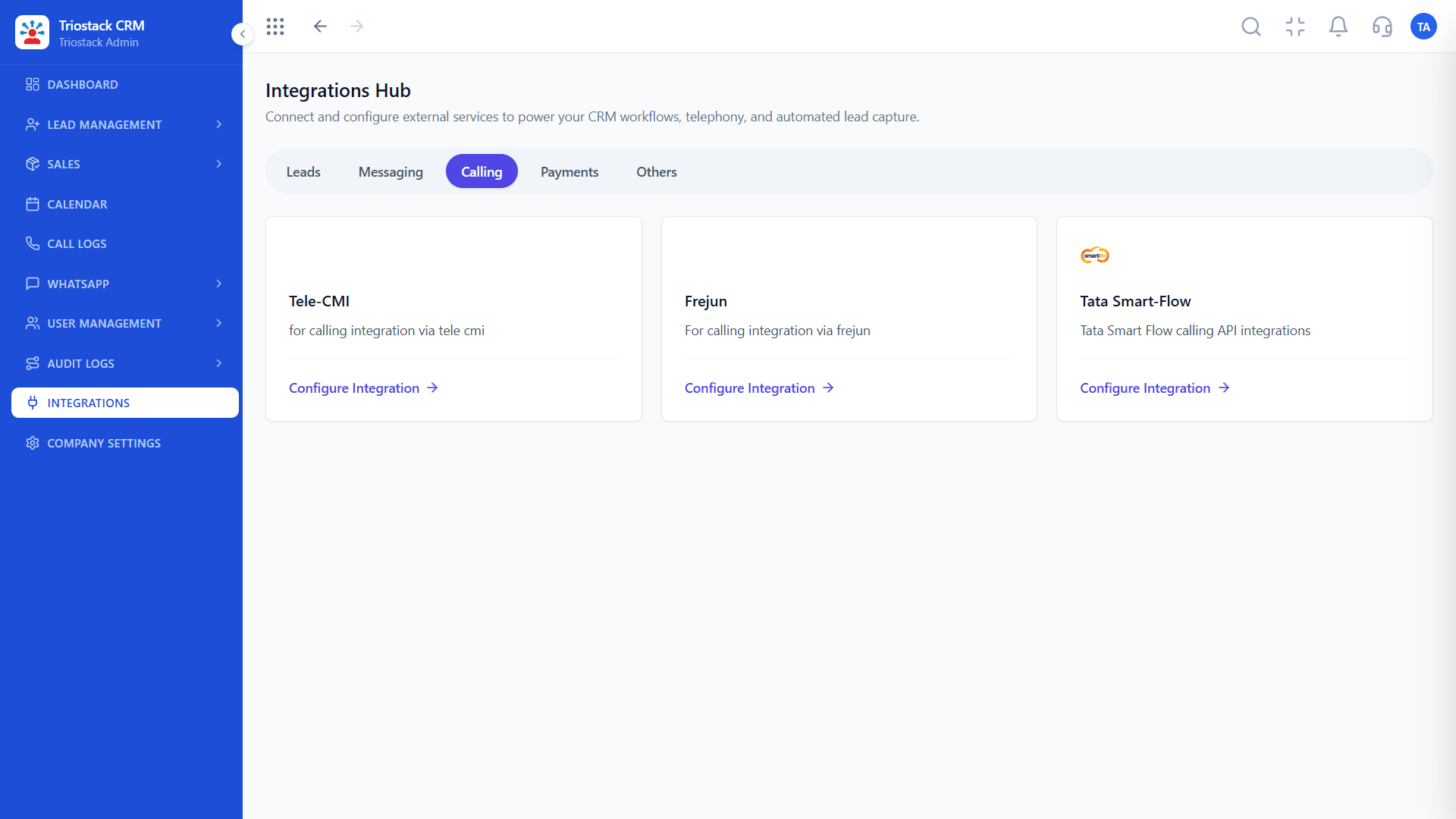
Integrations Hub
Website webhook is available today
Feature Breakdown
Captured directly from the production Triostack CRM interface.
Lead sources listed.
On this screen: Lead sources and tools connected in one place.
How it fits the plan
Start. Send store enquiries through the website webhook.
Route. Assign each lead to an owner.
Practical tip
Tag every webhook lead with its store and form, so you can tell which page produced it.

Website webhook and more.
On this screen: Appointment webhook, Google Calendar, Invoicing, Tickets, Blogs and Expense APIs.
How it fits the plan
Route. Assign each lead to an owner.
List. Write down the order data you want on the timeline.
In real life
Enquiry forms
Leads reach reps in moments.

Where enquiries land.
On this screen: Every lead with its source, status and owner.
How it fits the plan
List. Write down the order data you want on the timeline.
Ask. Scope anything beyond the webhook with our team.
Watch out for
Expecting abandoned-cart recovery from a webhook that only brings leads in.

Reply on time.
On this screen: Never miss the next call or message.
How it fits the plan
Ask. Scope anything beyond the webhook with our team.
Start. Send store enquiries through the website webhook.
Before you start
Execution Plan
Send store enquiries through the website webhook.
Assign each lead to an owner.
Write down the order data you want on the timeline.
Scope anything beyond the webhook with our team.
Practical Guide
Before you start
A tip that helps
Tag every webhook lead with its store and form, so you can tell which page produced it.
A common mistake
Expecting abandoned-cart recovery from a webhook that only brings leads in.
Availability: Availability can depend on your plan and setup. Please confirm with our team which capabilities are live for your account, and any prerequisites, before you plan around this page.
In Real Life
Scenario 01
Leads reach reps in moments.
Scenario 02
Routed to the right person.
Scenario 03
Context is the next step.
Straight answers about Shopify and WooCommerce Integration, from setup to what happens next.
Have a question about Shopify and WooCommerce Integration?
Book a free callNot as a listed connection. The Website Webhook is listed, and anything beyond it would be a custom engagement.
We do not claim that. Ask our team.
Ask us. It would be scoped as custom work.
Bringing enquiries and sign-ups in through the website webhook.
Shopify and WooCommerce are not listed CRM integrations. This page covers what online stores usually want in a CRM, and how a website webhook or custom work could help.
It runs in 4 steps: Start, Route, List and Ask. Send store enquiries through the website webhook.
The real screens on this page include Lead Pipeline, Call Logs, Sales Dashboard and Integrations Hub, all captured from the product.
Request a demo or start a free trial. Our team can also walk you through a guided setup, so your first session ends with something working.
Keep Exploring
Unify Meta leads, WhatsApp conversations, Android SIM calls, and GST invoices without per-seat price taxes.