The best Business Suite software in India, built to help your business grow. Contact us at +91-8882435276.
[ Contact ]
Phone number
Email address
Head office
Noida office
The right team at TriostackOne will get back to you.

Positioning Assessment
Every API has limits. For a business pushing thousands of records a day, from forms, ad platforms, an invoicing tool and a helpdesk, those limits decide whether data arrives on time.
TriostackOne's administration documentation covers API rate limits and webhooks. This page does not quote numbers, because the limits that apply to you come from the documentation and your agreement. If you expect heavy or bursty traffic, estimate your volume first, then ask our team whether higher quotas or dedicated handling are available and in writing.
“We counted records per hour at our busiest time. That one number made the conversation short.”
Sample team scenario
Illustrative example, not a customer testimonial

Lead Pipeline
Drag deals across your own sales stages
In the Product
Imagine checking the pipe before the rains come.
Not guesses.
Planned retries.
For anything higher.
Platform Integrity
In the admin docs
Event-driven intake
Your busiest hour
Ask our team
At a Glance
What to settle before a big integration goes live.
| Dimension | Triostack CRM | Unplanned Integration |
|---|---|---|
| Limits | Read from the documentation | Discovered in production |
| Peaks | Estimated and discussed | Surprise throttling |
| Retries | Designed in | Lost records |
| Higher quotas | Ask our team | Not considered |
| Support | Agreed contacts | Ad hoc |
Book a walkthrough and we will set up a sandbox with sample leads, a WhatsApp inbox and a pipeline, so you can try it before you commit.
Live Interface Tour
Real screens captured directly from the production Triostack CRM interface.
Webhooks and APIs
Listed in the administration documentation
Feature Breakdown
Captured directly from the production Triostack CRM interface.
01
CRMThe connections.
On this screen: Appointment webhook, Google Calendar, Invoicing, Tickets, Blogs and Expense APIs.
How it fits the plan
Count. Estimate records per hour at your peak.
Read. Check the documented limits.
Practical tip
Test at your real peak, not your average day. Throttling shows up at the peak.

02
CRMLead sources and tools.
On this screen: Lead sources and tools connected in one place.
How it fits the plan
Read. Check the documented limits.
Design. Add retries and queues on your side.
In real life
Large import
You size it before you run it.

03
CRMWhere records land.
On this screen: Every lead with its source, status and owner.
How it fits the plan
Design. Add retries and queues on your side.
Ask. Discuss higher quotas for your plan.
Watch out for
Sending a bulk import through an interface meant for live events.
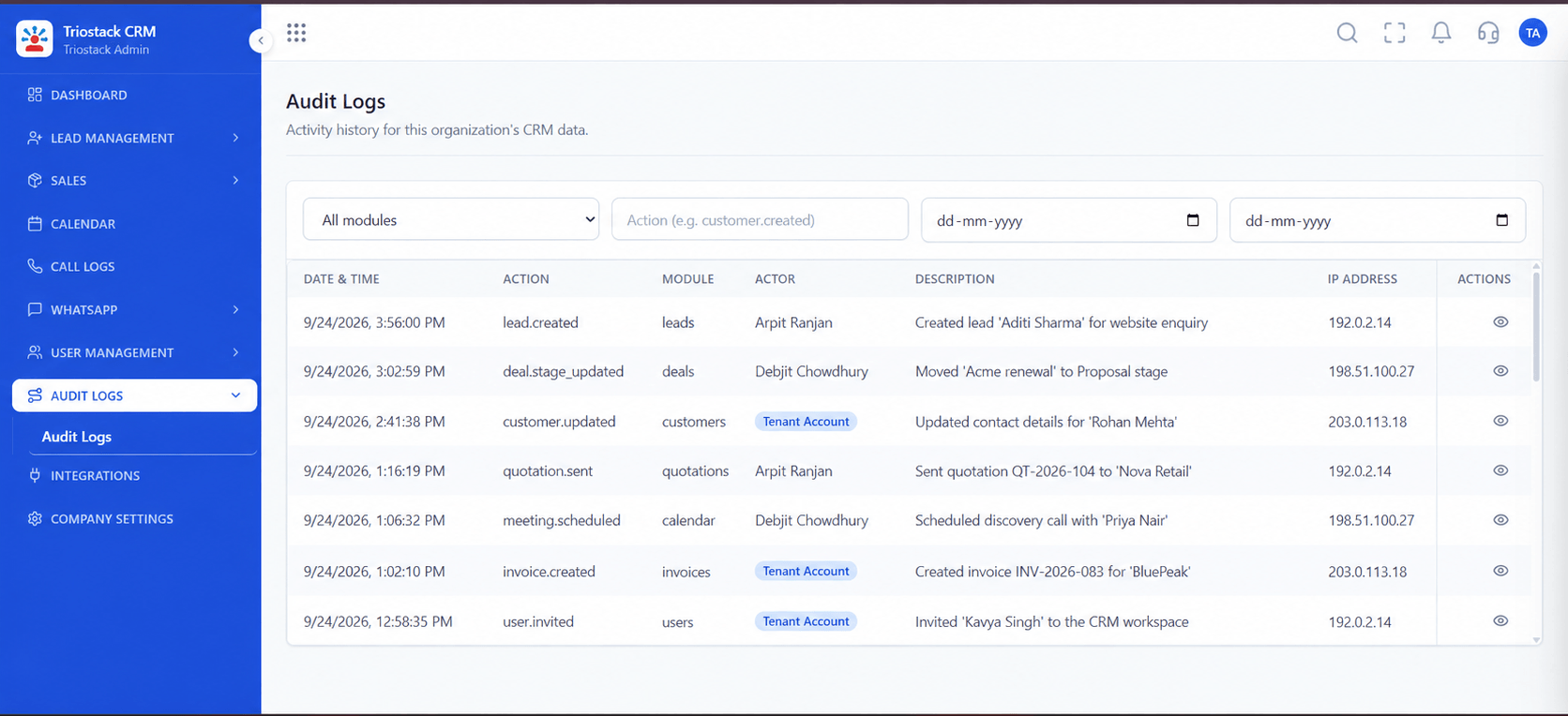
04
CRMTrace what arrived.
On this screen: A record of who did what in the workspace.
How it fits the plan
Ask. Discuss higher quotas for your plan.
Count. Estimate records per hour at your peak.
Before you start
Execution Plan
Estimate records per hour at your peak.
Check the documented limits.
Add retries and queues on your side.
Discuss higher quotas for your plan.
Practical Guide
Before you start
A tip that helps
Test at your real peak, not your average day. Throttling shows up at the peak.
A common mistake
Sending a bulk import through an interface meant for live events.
Availability: Availability can depend on your plan and setup. Please confirm with our team which capabilities are live for your account, and any prerequisites, before you plan around this page.
In Real Life
Scenario 01
You size it before you run it.
Scenario 02
Webhooks handle the burst.
Scenario 03
Retries keep data whole.
Straight answers about Enterprise API Rate Limits and Quotas, from setup to what happens next.
Have a question about Enterprise API Rate Limits and Quotas?
Book a free callThey are described in the administration documentation. We do not quote numbers on this page.
Ask our team. Anything agreed should be in writing.
Yes. The Integrations Hub lists a website webhook and an appointment webhook.
Plan retries and queues on your side, and ask us about expected behaviour.
How API rate limits affect large integrations, what to estimate before you connect, where the limits are documented, and how to discuss higher volumes with our team.
It runs in 4 steps: Count, Read, Design and Ask. Estimate records per hour at your peak.
The real screens on this page include Lead Pipeline, Call Logs, Sales Dashboard and Webhooks & APIs, all captured from the product.
Request a demo or start a free trial. Our team can also walk you through a guided setup, so your first session ends with something working.
Keep Exploring
Unify Meta leads, WhatsApp conversations, Android SIM calls, and GST invoices without per-seat price taxes.
Explore All Enterprise CRM