The best Business Suite software in India, built to help your business grow. Contact us at +91-8882435276.
[ Contact ]
Phone number
Email address
Head office
Noida office
The right team at TriostackOne will get back to you.
Built for
Automated WhatsApp Payment Reminders
Remind, pay, receipt
One message to pay, one to confirm
Positioning Assessment
Chasing payments by hand is slow and awkward, and it is the first thing that slips on a busy day. A reminder on the right day, with a way to pay in one tap, collects more than a polite phone call a week later.
Triostack CRM schedules WhatsApp reminders around each invoice's due date: a heads-up before it is due, a reminder on the day and follow-ups after. Every message carries the invoice as an attachment and a payment magic link, so the customer can pay online in full or in part. When the payment succeeds, the invoice status updates and an automatic receipt goes back on WhatsApp. Reminders use approved templates and stop when the invoice is paid.
“An invoice was paid within an hour of the reminder, and the receipt was in the chat before I opened my laptop.”
Sample team scenario
A made-up scenario about Automated WhatsApp Payment Reminders, not a customer testimonial

Lead Pipeline
Automated WhatsApp Payment Reminders: drag deals across your own sales stages
In the Product
Imagine every reminder arriving with a way to pay.
Without effort.
From the message.
On payment.
Platform Integrity
Before, on, after
Pay in one tap
In the message
On payment
At a Glance
What changes in collections.
Timing
Scheduled around the due date
Chasing by Hand: When someone has time
Payment
A magic link in the message
Chasing by Hand: Bank details by chat
Invoice
Attached automatically
Chasing by Hand: Forwarded
Receipt
Sent on payment
Chasing by Hand: Written by hand
Stopping
Reminders stop once paid
Chasing by Hand: Awkward second reminders
Book a walkthrough of Automated WhatsApp Payment Reminders. We set up a sandbox so you can try Scheduled alerts, Payment magic links and Invoice attachments before you commit.
Live Interface Tour
The screens below belong to Automated WhatsApp Payment Reminders: Lead Pipeline, Call Logs and Sales Dashboard, all from the product.
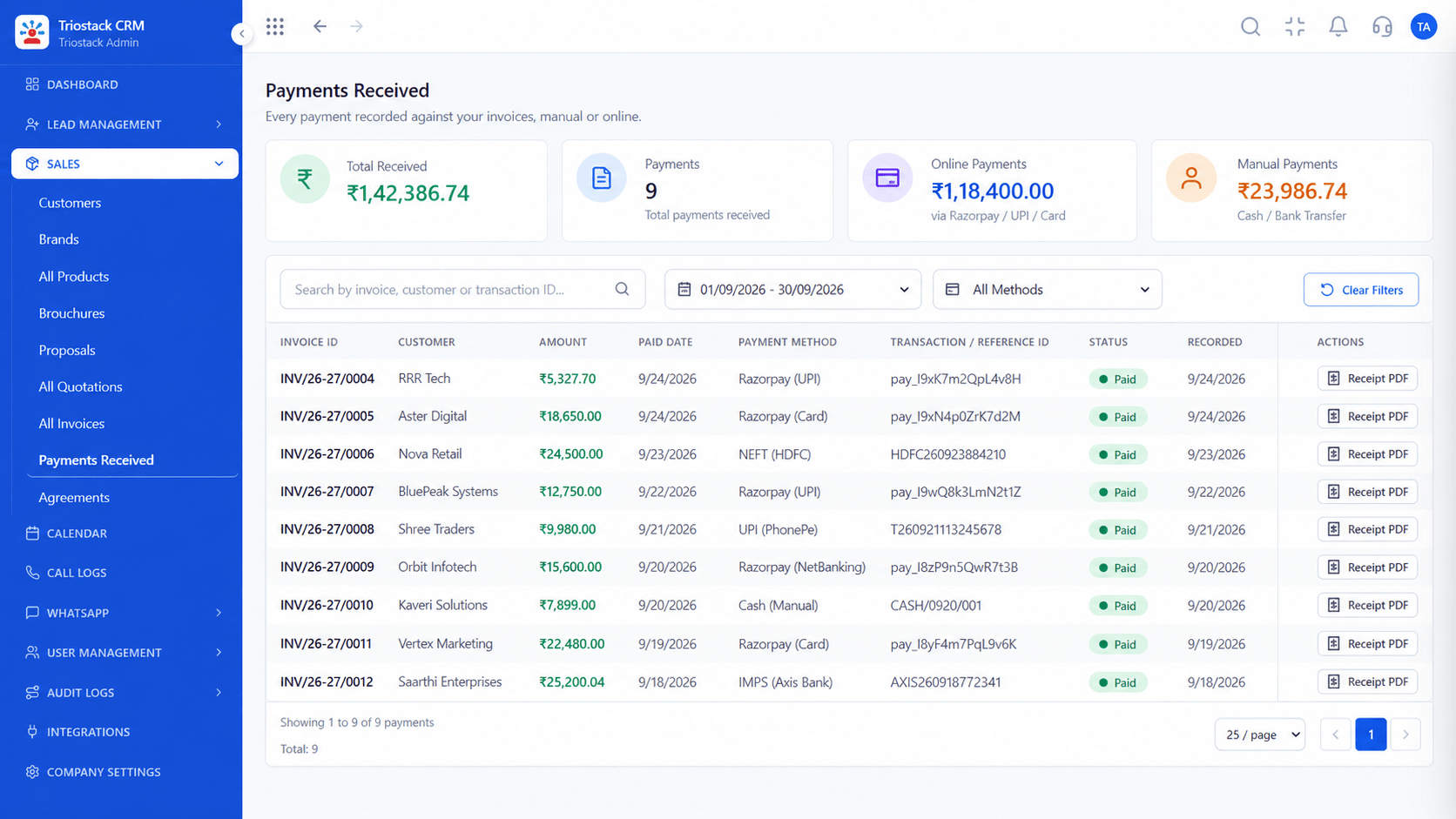
Payments Received
Automated WhatsApp Payment Reminders: one message to pay, one to confirm
Feature Breakdown
4 screens from the live product that show Automated WhatsApp Payment Reminders at work.
Recorded per invoice.
How it fits the plan
Schedule. Choose when reminders go relative to the due date.
Template. Approve the reminder wording.
Practical tip
Start with a friendly heads-up before the due date. Most customers pay then, and you never need the firmer reminders.

What is being chased.
In real life
Month-end collections
Reminders go out on the day.
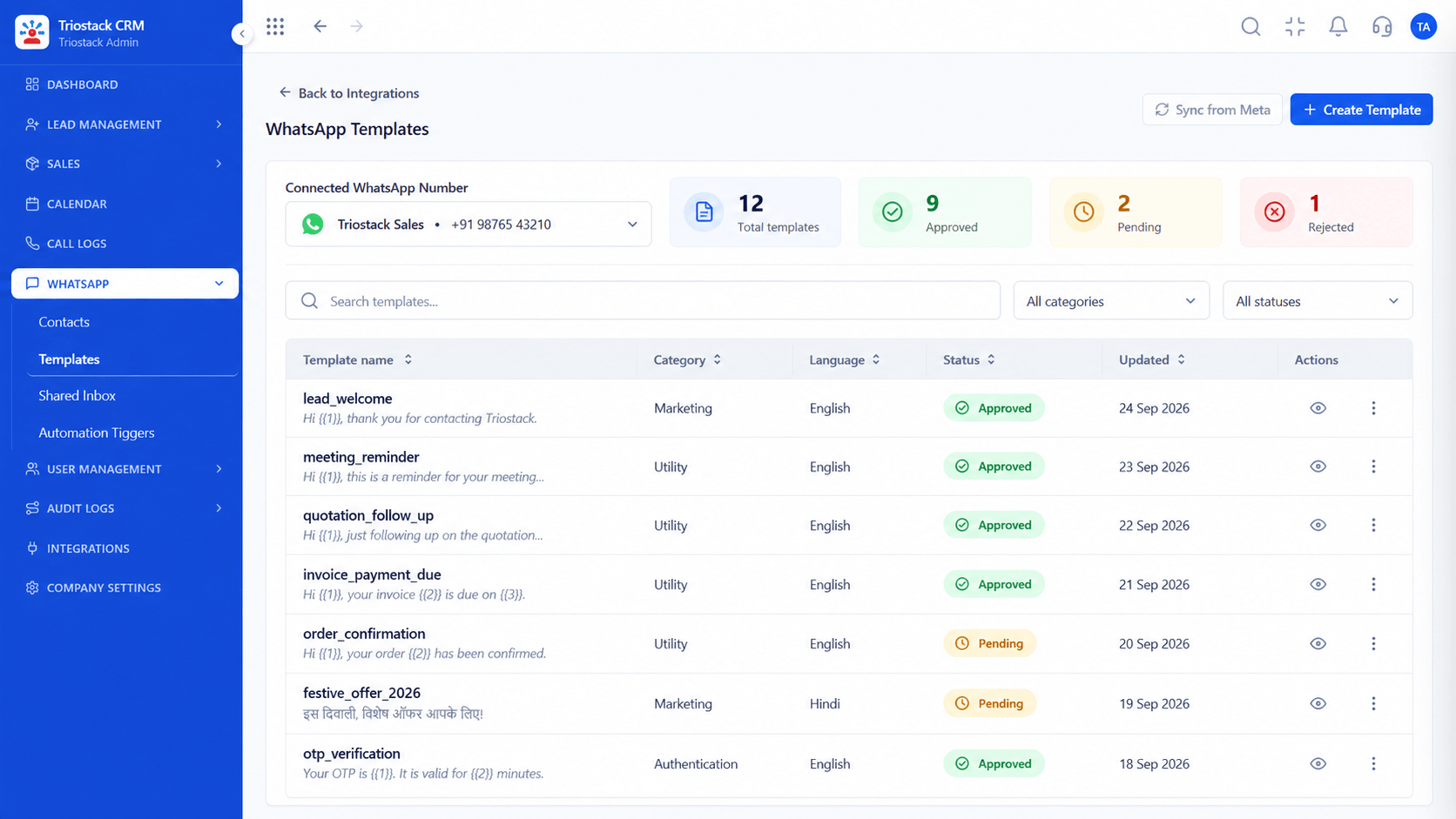
Reminder wording.
Watch out for
Sending reminders to customers who have already paid because payments were recorded late.

Escalate to a call.
Before you start
Execution Plan
Choose when reminders go relative to the due date.
Approve the reminder wording.
Add the payment magic link and invoice.
Turn on the automatic receipt.
Practical Guide
Before you start
A tip that helps
Start with a friendly heads-up before the due date. Most customers pay then, and you never need the firmer reminders.
A common mistake
Sending reminders to customers who have already paid because payments were recorded late.
Availability: What Automated WhatsApp Payment Reminders covers can depend on your plan and setup. Please confirm with our team which parts are live for your account, and any prerequisites, before you plan around it.
In Real Life
Scenario 01
Reminders go out on the day.
Scenario 02
The balance is chased on its own.
Scenario 03
Nobody wastes a call on them.
Straight answers about Automated WhatsApp Payment Reminders, from setup to what happens next.
Have a question about Automated WhatsApp Payment Reminders?
Book a free callYes, before the due date, on it and after.
Yes, through a payment magic link, in full or in part.
Yes, to each reminder.
Yes, on successful payment.
Scheduled WhatsApp payment follow-ups with payment magic links, invoice attachments and automatic receipt delivery, so unpaid invoices get chased without effort.
It runs in 4 steps: Schedule, Template, Link and Receipt. Choose when reminders go relative to the due date.
The real screens on this page include Lead Pipeline, Call Logs, Sales Dashboard and Payments Received, all captured from the product.
Request a demo and ask to see Automated WhatsApp Payment Reminders. Our team can also walk you through setup, so your first session ends with something working.
We will walk you through Automated WhatsApp Payment Reminders, from Scheduled alerts, Payment magic links and Invoice attachments, on sample data shaped like yours.
Explore All CRM Features




