The best Business Suite software in India, built to help your business grow. Contact us at +91-8882435276.
[ Contact ]
Phone number
Email address
Head office
Noida office
The right team at TriostackOne will get back to you.

Stage
Choose the lifecycle stage that starts it.
Write
Draft templates and set the delays.
Trigger
Define what a reply, a click and silence do.
Hand over
Set the follow-up task for the agent.
Positioning Assessment
Most WhatsApp marketing is either a single blast or a pile of manual follow-ups. A drip sequence sits between: a short series of messages sent over days, keyed to where the lead is and how they respond.
In Triostack CRM, a drip starts when a lead enters a lifecycle stage, such as new, interested or quote sent, and sends approved WhatsApp templates at the delays you set. Engagement triggers branch the sequence: a reply stops it and assigns an agent, a click on a link moves the lead forward, and silence sends a gentler reminder. Agent follow-up timelines create a task with a due time whenever a human should take over. Messages go only to people who agreed to receive them, and templates follow Meta's rules.
“A lead replied on day two. The drip stopped itself and a rep had the chat within minutes.”
Sample team scenario
A made-up scenario about WhatsApp Drip Marketing Automation, not a customer testimonial

All Leads
WhatsApp Drip Marketing Automation: every lead with its source, status and owner
In the Product
Imagine the first messages sent and a person ready for the reply.
Not one blast.
And assign a person.
Always.
Platform Integrity
By stage
Reply, click, silence
Tasks with due times
With consent
At a Glance
What a sequence saves a sales team.
| Dimension | Triostack CRM | Manual Follow-Up |
|---|---|---|
| Start | A lifecycle stage starts the sequence | A rep remembers |
| Timing | Delays set once | Ad hoc |
| Replies | Stop the sequence and assign an agent | Missed in a busy inbox |
| Handover | A task with a due time | Hopefully |
| Consent | Only people who agreed | Everyone on the list |
Book a walkthrough of WhatsApp Drip Marketing Automation. We set up a sandbox so you can try Lifecycle sequences, Engagement triggers and Agent follow-up before you commit.
Live Interface Tour
The screens below belong to WhatsApp Drip Marketing Automation: All Leads, Lead Pipeline and Sales Dashboard, all from the product.
WhatsApp Automation
WhatsApp Drip Marketing Automation: sent by rule, handed to a person at the right time
Feature Breakdown
4 screens from the live product that show WhatsApp Drip Marketing Automation at work.
Triggers and sequences.
How it fits the plan
Stage. Choose the lifecycle stage that starts it.
Write. Draft templates and set the delays.
Practical tip
Keep a drip to three or four messages. A fifth message is where goodwill turns into opt-outs.
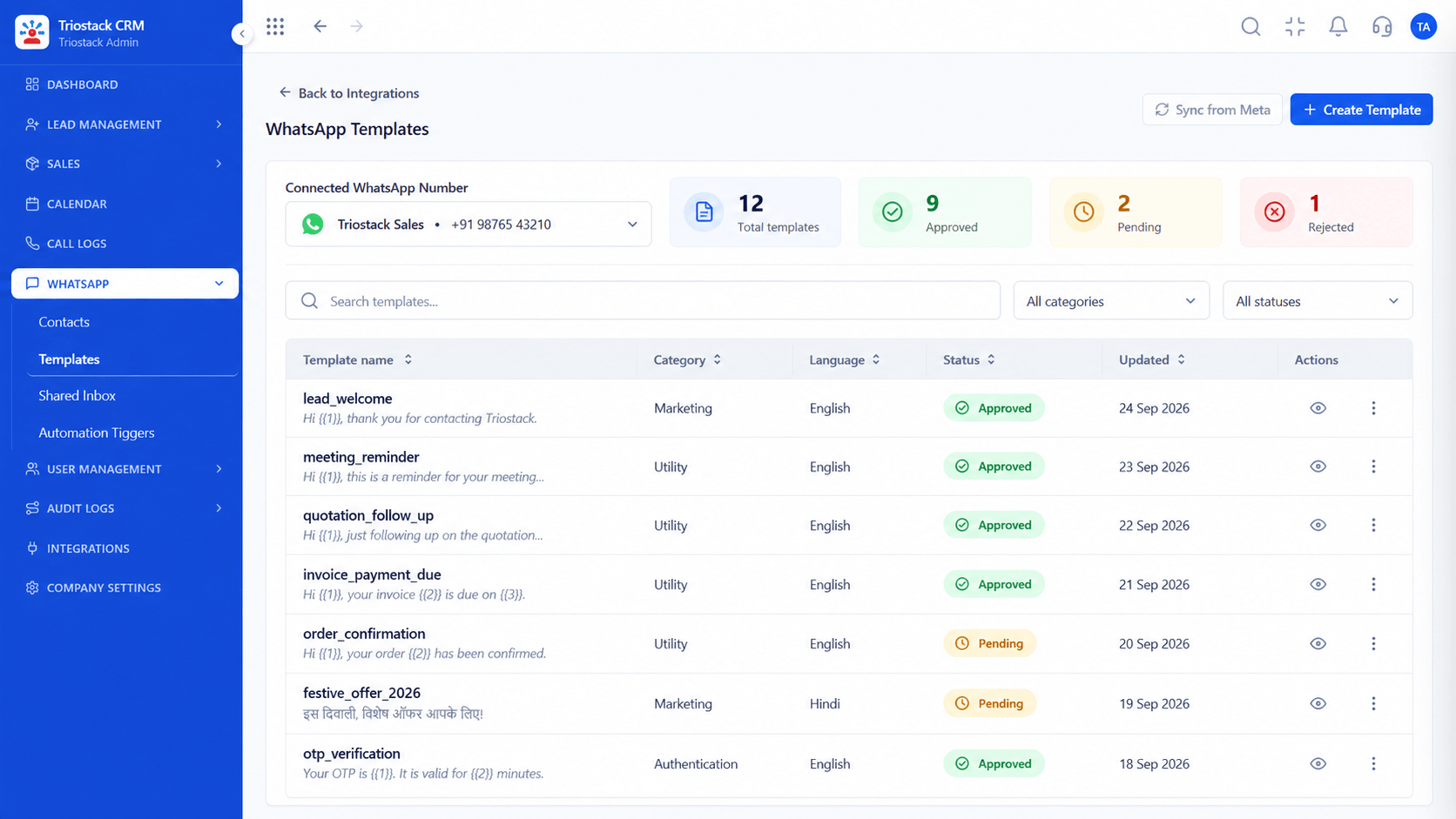
Approved messages.
How it fits the plan
Write. Draft templates and set the delays.
Trigger. Define what a reply, a click and silence do.
In real life
New enquiry
A welcome and a nudge go out.

Agent tasks.
How it fits the plan
Trigger. Define what a reply, a click and silence do.
Hand over. Set the follow-up task for the agent.
Watch out for
Adding people to a drip without clear consent, which risks the sender's WhatsApp number.

Where replies land.
How it fits the plan
Hand over. Set the follow-up task for the agent.
Stage. Choose the lifecycle stage that starts it.
Before you start
Execution Plan
Choose the lifecycle stage that starts it.
Draft templates and set the delays.
Define what a reply, a click and silence do.
Set the follow-up task for the agent.
Practical Guide
Before you start
A tip that helps
Keep a drip to three or four messages. A fifth message is where goodwill turns into opt-outs.
A common mistake
Adding people to a drip without clear consent, which risks the sender's WhatsApp number.
Availability: What WhatsApp Drip Marketing Automation covers can depend on your plan and setup. Please confirm with our team which parts are live for your account, and any prerequisites, before you plan around it.
In Real Life
Scenario 01
A welcome and a nudge go out.
Scenario 02
A reminder follows in two days.
Scenario 03
A gentle last message closes the loop.
Straight answers about WhatsApp Drip Marketing Automation, from setup to what happens next.
Have a question about WhatsApp Drip Marketing Automation?
Book a free callYes, sequences start from a lifecycle stage and send approved templates at set delays.
Rules for what happens on a reply, a click or no response.
A reply stops the sequence and creates a follow-up task with a due time.
Yes. Send only to people who agreed, and follow Meta's rules.
Automated WhatsApp drip sequences based on lead lifecycle stages, engagement triggers and agent follow-up timelines, using approved templates with consent.
It runs in 4 steps: Stage, Write, Trigger and Hand over. Choose the lifecycle stage that starts it.
The real screens on this page include All Leads, Lead Pipeline, Sales Dashboard and WhatsApp Automation, all captured from the product.
Request a demo and ask to see WhatsApp Drip Marketing Automation. Our team can also walk you through setup, so your first session ends with something working.
Keep Exploring
We will walk you through WhatsApp Drip Marketing Automation, from Lifecycle sequences, Engagement triggers and Agent follow-up, on sample data shaped like yours.
Explore All CRM Features